
自定义 CSS、JavaScript、HTML
CSS
1.
2.
使用保留的 CSS 变量
--g- 为前缀的 CSS 变量,用于控制字体、颜色、背景等基础页面样式。这些变量能够很好地适配浅色和深色模式,使你的样式更加稳定且易于维护。示例:更改主文本颜色
使用保留的 CSS 类名
.g- 前缀的类名。这些类名相对稳定,不太可能因 DOM 变化而失效。示例:隐藏左侧边栏
检查页面结构和类名
.g- 开头的类名。这些类名由平台保留,结构相对稳定,不容易失效。对于其他结构类名,请谨慎使用,以避免产品升级后样式失效。Command + Option + I或fn + F12Ctrl + Shift + I或fn + F12或F12Cmd/Ctrl + F)来定位类名。JavaScript
<script> 或 <style> 标签。你必须将其转换为纯 JavaScript。例如:❌ 原始代码(不支持)
✅ 转换为纯 JavaScript
I'm using Apidog's "Custom JavaScript" feature, which only allows pure JavaScript (no <script> or <style> tags).

Please convert the following code to pure JavaScript. Here are the requirements:
1. Rewrite the <script> tag to document.createElement('script') dynamic creation method;
2. Inject the <style> content into the newly created style tag and insert the head;
3. Please use standard methods (such as createElement, appendChild) for all DOM operations, and do not use document.write;
4. If the original code uses `window.addEventListener('DOMContentLoaded', ...)` or `window.addEventListener('load', ...)` only to wait for the page before running code, remove the event listener and run the code directly. Apidog executes custom JavaScript after the documentation page has been rendered, so the browser's `load` event may already have passed by that time; code registered inside a `load` listener may not be executed;
5. The final generated JavaScript should be able to run directly in the browser without any explanation.

Original code:
---
(paste your code here)
---
https://xxx.apidog.io/ 开头),自定义 JS 将不会被加载和执行。load 事件可能已经过去,放在 window.addEventListener('load', ...) 内的代码可能不会运行。在大多数情况下,请直接运行你的代码:示例:可展开/折叠的框
将代码粘贴到 Apidog 的“Custom JavaScript”区域。
通过你的自定义域名访问文档站点。
右下角会出现一个按钮;点击即可打开聊天 iframe。
将 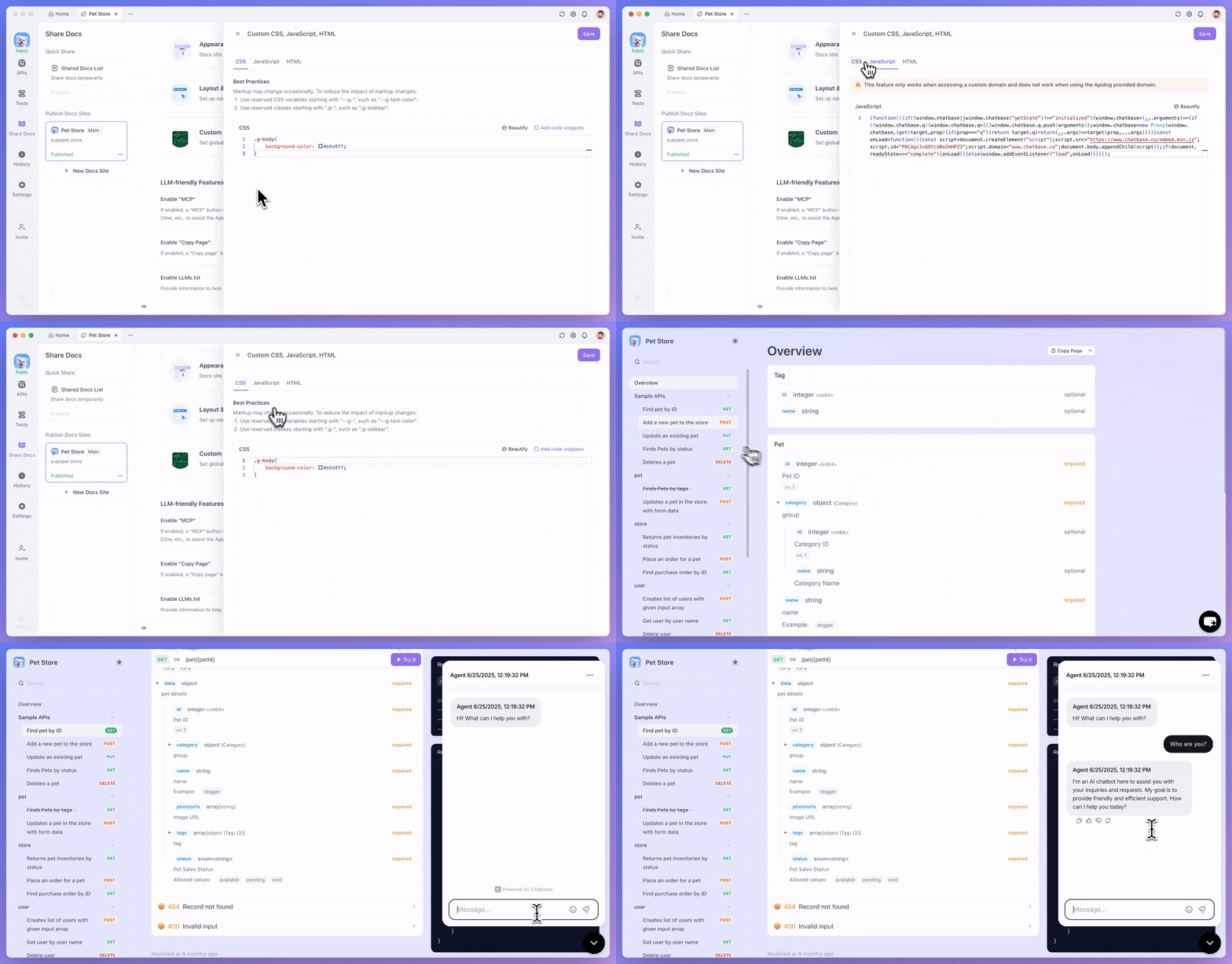
iframe.src 替换为你的 AI 服务,例如:示例:嵌入 Chatbase 小组件
创建一个 Chatbase 应用,获取嵌入代码,并使用上面的提示词将其转换为纯 JS。
将转换后的代码粘贴到 Apidog 的 Custom JS 区域。
通过你的自定义域名访问文档站点。
右下角会出现一个按钮。点击它即可打开对话窗口。
HTML
常见问题
Modified at 2026-06-09 08:55:47